Prerequisites
$ composer require twilio/sdk
$ composer require guzzlehttp/guzzle
Next, Go to your Twilio dashboard and copy your ACCOUNT SID and AUTH TOKEN which will be used for authenticating your requests with the Twilio SDK:
Proceed to update your constant variables with these credentials. Open up your config/constants.php file and add the following variables:
define('TWILIO_SID', "TWILIO_SID");
define('TWILIO_AUTH_TOKEN', "TWILIO_AUTH_TOKEN");
define('TWILIO_WHATSAPP_NUMBER', "+14XXXXXXXX6");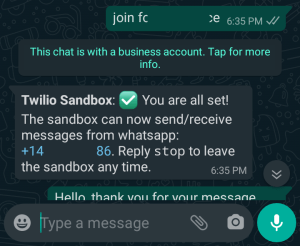
Create a Chatbot.php in the applications/controllers/ directory.
<?php
defined('BASEPATH') OR exit('No direct script access allowed');

use GuzzleHttpExceptionRequestException;
use TwilioRestClient;
// Load Composer's autoloader
require 'vendor/autoload.php';

class Chatbot extends CI_Controller {

    public function __construct() {
        parent::__construct();
    }

    public function index() {
    }

    public function listenToReplies() {
        $from       = $this->input->post('From');
        $body       = $this->input->post('Body');
        $client     = new GuzzleHttpClient();
        try {
            $response = $client->request('GET',
                        "https://api.github.com/users/junaidsshaikh");
            $githubResponse = json_decode($response->getBody());
            if ($response->getStatusCode() == 200) {
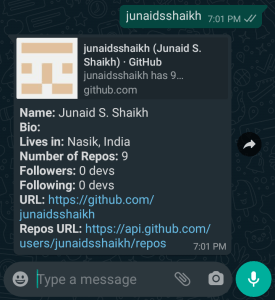
                $message = "*Name:* $githubResponse->namen";
                $message .= "*Bio:* $githubResponse->bion";
                $message .= "*Lives in:* $githubResponse->locationn";
                $message .= "*Followers:* $githubResponse->followers devsn";
                $message .= "*Following:* $githubResponse->following devsn";
                $message .= "*Number of Repos:* $githubResponse->public_reposn";
                $message .= "*URL:* $githubResponse->html_urln";
                $message .= "*Repos URL:* $githubResponse->repos_urln";
                $this->sendWhatsAppMessage($message, $from);
            } else {
                $this->sendWhatsAppMessage($githubResponse->message, $from);
            }
        } catch (RequestException $th) {
            $response = json_decode($th->getResponse()->getBody());
            $this->sendWhatsAppMessage($response->message, $from);
        }
    }

    public function sendWhatsAppMessage($message, $recipient) {
        $twilio_whatsapp_number = TWILIO_WHATSAPP_NUMBER;
        $account_sid = TWILIO_SID;
        $auth_token = TWILIO_AUTH_TOKEN;
        $client = new Client($account_sid, $auth_token);
        return $client->messages->create($recipient,
                array('from' => "whatsapp:$twilio_whatsapp_number",
                'body' => $message));
    }
}
listenToReplies()
The listenToReplies() method is where messages sent to your WhatsApp number will be executed. The response sent will rely on the body the received message.
public function listenToReplies() {
    $from       = $this->input->post('From');
    $body       = $this->input->post('Body');
    $client     = new GuzzleHttpClient();
    try {
        $response = $client->request('GET',
                    "https://api.github.com/users/junaidsshaikh");
        $githubResponse = json_decode($response->getBody());
        if ($response->getStatusCode() == 200) {
            $message = "*Name:* $githubResponse->namen";
            $message .= "*Bio:* $githubResponse->bion";
            $message .= "*Lives in:* $githubResponse->locationn";
            $message .= "*Followers:* $githubResponse->followers devsn";
            $message .= "*Following:* $githubResponse->following devsn";
            $message .= "*Number of Repos:* $githubResponse->public_reposn";
            $message .= "*URL:* $githubResponse->html_urln";
            $message .= "*Repos URL:* $githubResponse->repos_urln";
            $this->sendWhatsAppMessage($message, $from);
        } else {
            $this->sendWhatsAppMessage($githubResponse->message, $from);
        }
    } catch (RequestException $th) {
        $response = json_decode($th->getResponse()->getBody());
        $this->sendWhatsAppMessage($response->message, $from);
    }
}
sendWhatsAppMessage()
The sendWhatsAppMessage() method uses the Twilio SDK for sending the WhatsApp messages:
>public function sendWhatsAppMessage($message, $recipient) {
    $twilio_whatsapp_number = TWILIO_WHATSAPP_NUMBER;
    $account_sid = TWILIO_SID;
    $auth_token = TWILIO_AUTH_TOKEN;
    $client = new Client($account_sid, $auth_token);
    return $client->messages->create($recipient,
            array('from' => "whatsapp:$twilio_whatsapp_number",
            'body' => $message));
}
Setup the Webhook – config/routes.php
$route['api/chat-bot'] = 'Chatbot/listenToReplies';
Update the Sandbox Webhook
Go to the WhatsApp sandbox settings in your Twilio dashboard and update the input field labeled as “WHEN A MESSAGE COMES IN” with the complete URL to your chatbot.
Your webhook URL must be in the following format:
https://<hostname>/api/chat-bot
Output