



Close Menu
InfovistarInfovistar
  • AI & ML
  • Cybersecurity
  • Money
    • Personal Finance
  • Insights
    • Tech News
    • Tech Tips
    • Startup
    • Web Development
    • AWS and Cloud
    • Technology
  • Courses
    • Machine Learning
      • Python Tutorial
      • TensorFlow Tutorial
      • OpenCV
    • DSA
      • Data Structures
    • Web Development
      • PHP Tutorial
      • CodeIgniter Tutorial
      • CodeIgniter 4 Tutorial
      • CodeIgniter 4 AJAX
      • JavaScript
    • Mobile App Development
      • Android Tutorial
  • Tools
    • Beautifier
      • HTML Beautifier
      • JavaScript Beautifier
      • CSS Beautifier
    • Online Compilers
      • Python Compiler
      • Java Compiler
      • JavaScript Editor
      • PHP Compiler
      • C++ Compiler
      • C Compiler
    • Image Optimization
      • Image Compressor
      • JPEG to PNG
      • PNG to JPEG
      • WebP to PNG
Trending News
Microsoft 365 Outage_ Outlook, Teams and Copilot Down. What We Know

Microsoft 365 Outage: Outlook, Teams and Copilot Down. What We Know

November 13, 2026
Diwali online shopping scams warning for shoppers in India

Diwali Online Shopping Scams 2026: 10 Ways to Stay Safe

November 7, 2026
Best DDoS Protection Services

10 Best DDoS Protection Services for 2027

November 5, 2026
Facebook X (Twitter) Instagram
Friday, November 13
Trending
  • Microsoft 365 Outage: Outlook, Teams and Copilot Down. What We Know
  • Diwali Online Shopping Scams 2026: 10 Ways to Stay Safe
  • 10 Best DDoS Protection Services for 2027
  • 12 Best Web Application Firewalls (WAF) for 2027
  • Best Ethical Hacking Tools in 2027: Free & Paid Picks
  • Software supply chain attacks 2026: Timeline and developer checklist
  • Binance Hack: $6.3 Billion Drained in the Largest Crypto Theft Ever. What We Know So Far
  • This Site Uses XSLT Chrome Warning Explained: How to Fix It
Facebook X (Twitter) Instagram Pinterest LinkedIn WhatsApp
InfovistarInfovistar
  • AI & ML
  • Cybersecurity
  • Money
    • Personal Finance
  • Insights
    • Tech News
    • Tech Tips
    • Startup
    • Web Development
    • AWS and Cloud
    • Technology
  • Courses
    • Machine Learning
      • Python Tutorial
      • TensorFlow Tutorial
      • OpenCV
    • DSA
      • Data Structures
    • Web Development
      • PHP Tutorial
      • CodeIgniter Tutorial
      • CodeIgniter 4 Tutorial
      • CodeIgniter 4 AJAX
      • JavaScript
    • Mobile App Development
      • Android Tutorial
  • Tools
    • Beautifier
      • HTML Beautifier
      • JavaScript Beautifier
      • CSS Beautifier
    • Online Compilers
      • Python Compiler
      • Java Compiler
      • JavaScript Editor
      • PHP Compiler
      • C++ Compiler
      • C Compiler
    • Image Optimization
      • Image Compressor
      • JPEG to PNG
      • PNG to JPEG
      • WebP to PNG
InfovistarInfovistar
Home » Google is rolling out Identity Check Feature to Android 15
Tech News

Google is rolling out Identity Check Feature to Android 15

InfovistarBy InfovistarJanuary 25, 20255 Mins Read
Share Facebook Twitter Pinterest LinkedIn Tumblr Reddit Telegram Email
Google is rolling out Identity Check Feature to Android 15
Share
Facebook Twitter LinkedIn Pinterest Email

Google has introduced an innovative security feature for Android devices called Identity Check. This feature ensures device safety by requiring biometric authentication to access sensitive settings when outside trusted locations. This significant update is part of Google’s ongoing efforts to enhance Android security.

What Is Android’s Identity Check Feature?

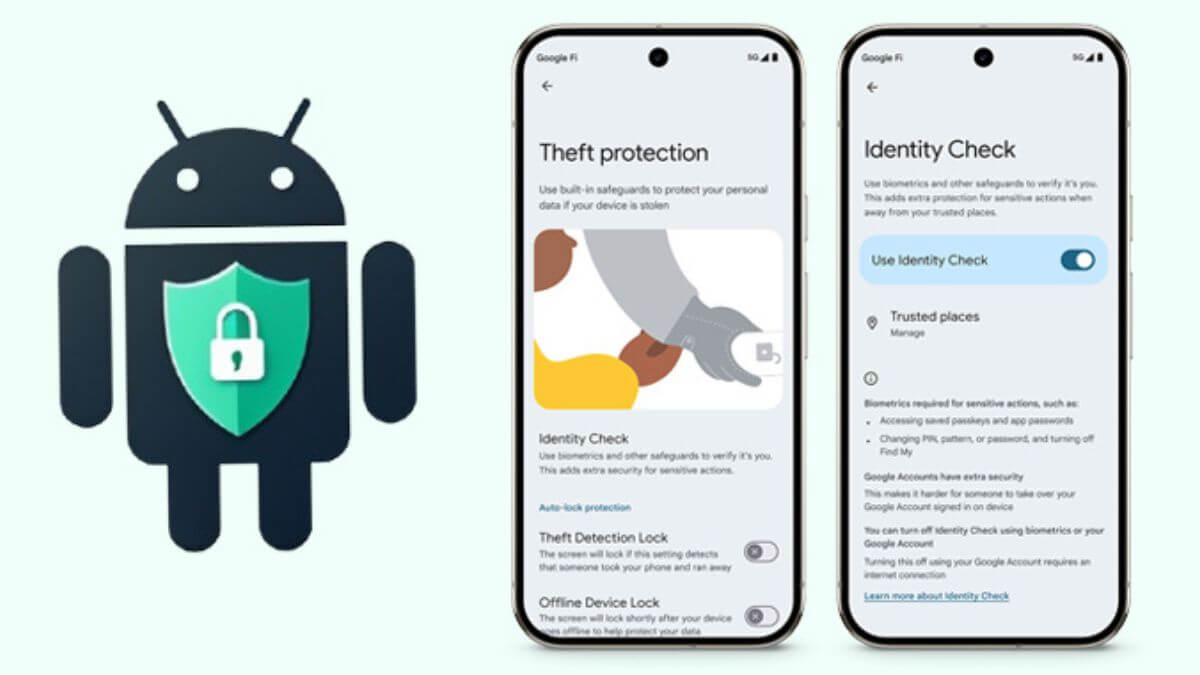
Identity Check is designed to protect your device from unauthorized access. It locks critical device settings behind biometric verification when you step outside trusted locations. The feature ensures that only verified users can make sensitive changes or access secure resources on their devices.

How Does It Work?

When enabled, Identity Check requires biometric verification for various tasks. These include accessing saved passwords, changing screen locks, running a factory reset, or even turning off theft protection features.

Google’s goal is to add an extra layer of security against unauthorized access. This makes it harder for anyone to exploit sensitive settings or features without proper verification.

Actions Requiring Biometric Authentication

With Identity Check activated, the following actions require explicit biometric authentication:

  • Accessing saved passwords and passkeys through Google Password Manager.
  • Using Google Password Manager to autofill passwords in apps (except in Chrome).
  • Changing screen lock settings, including PINs, patterns, and passwords.
  • Modifying biometric settings, like fingerprint or face unlock.
  • Running a factory reset on the device.
  • Turning off Find My Device or theft protection features.
  • Viewing or modifying trusted places.
  • Turning off Identity Check itself.
  • Setting up a new device with the current one.
  • Adding or removing a Google account.
  • Accessing developer options.

These measures aim to safeguard user data and device settings, especially in untrusted environments.

Why Is Identity Check Important?

This feature is a response to rising threats against mobile devices. Unauthorized access to devices can lead to stolen data, compromised accounts, and significant losses. Identity Check adds robust protection for critical actions, reducing the risk of unauthorized changes.

Enhanced Google Account Protection

Identity Check doesn’t just protect device settings. It also strengthens Google Account security. Enhanced protection prevents unauthorized individuals from gaining control of any Google account linked to the device.

This ensures that sensitive data within Google services remains secure, even if the device falls into the wrong hands.

Which Devices Support Identity Check?

Currently, Identity Check is available for:

  • Google Pixel devices running Android 15.
  • Eligible Samsung Galaxy phones with One UI 7.

To enable the feature, follow these steps:

  1. Open Settings.
  2. Navigate to Google > All services > Theft protection.
  3. Select Identity Check and toggle it on.

Once enabled, the feature begins securing your device instantly.

Other Security Features from Google

Google has consistently introduced features to protect Android users from theft. Some notable additions include:

  1. Theft Detection Lock: An AI-powered feature now available globally for devices running Android 10 and later.
  2. Offline Device Lock: Secures devices even when they are disconnected from the internet.
  3. Remote Lock: Allows users to lock their devices remotely in case of theft.

Google is also collaborating with GSMA and industry experts to fight mobile device theft. They are sharing tools, information, and prevention techniques to improve security globally.

Also read | Google’s New Restore Credentials Tool Simplifies App Login

Chrome Web Store for Enterprises

In addition to mobile security, Google has launched the Chrome Web Store for Enterprises. This platform allows organizations to curate a list of safe extensions for employees.

By restricting unvetted extensions, businesses can minimize risks associated with malicious add-ons. This move protects corporate data and ensures secure browsing environments.

Also read | OpenAI Unveils Web-Based AI Agent Operator for Task Automation

Emerging Threats and Google’s Response

Security threats to mobile and web platforms are growing rapidly. Last month, researchers uncovered a spear-phishing campaign targeting Chrome extension developers. The attackers inserted malicious code to steal sensitive data like API keys, session cookies, and authentication tokens.

The campaign has been active since December 2023. Attackers shifted tactics recently by compromising legitimate Chrome extensions. They used phishing emails, malicious OAuth applications, and injected code to spread malware.

Google is actively addressing such threats. By enhancing mobile and web security, it aims to create safer digital environments for users worldwide.

How Does This Benefit Users?

Identity Check and other security updates demonstrate Google’s commitment to user safety. These measures protect personal data, accounts, and devices from unauthorized access.

The added layer of biometric authentication also ensures that sensitive actions remain secure. Whether you’re accessing passwords, changing settings, or securing accounts, you can trust that your data is safe.

Also read | Microsoft joins India’s AI mission to train 5 lakh people by 2026

Future of Android Security

Google is continuously improving Android security. With features like Identity Check and Theft Detection Lock, the company is setting new standards in mobile protection.

As threats evolve, users can expect more innovative solutions from Google to stay ahead of potential risks.

Also read | Java vs Kotlin: Which is Better for Android Development?

Conclusion

Google’s Identity Check feature is a game-changer for Android security. It ensures that sensitive settings and accounts are protected outside trusted locations.

With biometric authentication as the key, unauthorized access becomes nearly impossible. Combined with other security features, Identity Check offers peace of mind to Android users.

Stay secure by enabling Identity Check on your device today. Experience the future of mobile security with Google’s innovative solutions.


Android Android 15 Google New Identity Check Feature
Share. Facebook Twitter Pinterest LinkedIn Tumblr Email
Previous ArticleOpenAI Unveils Web-Based AI Agent Operator for Task Automation
Next Article Top AI App DeepSeek Restricts Users Amid Cyberattacks
Infovistar
  • Website
  • Facebook
  • X (Twitter)
  • Instagram
  • LinkedIn

Related Posts

iPad mini OLED Price in India
Tech News

iPad mini OLED Price in India: Wi-Fi & Cellular Variants, Offers

October 30, 2026
iMac M6 Price in India
Tech News

iMac M6 Price in India: All Variants, Colors, Offers and Release Date

October 30, 2026
MacBook Pro M6 Price in India_ All Variants, Offers & Release Date
Tech News

MacBook Pro M6 Price in India

October 29, 2026
Add A Comment

Comments are closed.

Blog Categories
  • AI and ML (106)
  • Android (4)
  • AWS and Cloud (9)
  • Cybersecurity (83)
  • Money (12)
  • Personal Finance (6)
  • Startup (37)
  • Tech News (82)
  • Tech Tips (28)
  • Technology (73)
  • Web Development (25)
Top Posts
Google is rolling out Identity Check Feature to Android 15

Google is rolling out Identity Check Feature to Android 15

January 25, 20252,375 Views
How to Integrate Google Gemini to WhatsApp

How to Use Google Gemini with WhatsApp in 2026

February 16, 20241,913 Views
OpenAI Unveils Web-Based AI Agent Operator for Task Automation

OpenAI Unveils Web-Based AI Agent Operator for Task Automation

January 24, 20251,508 Views
Stay In Touch
  • Facebook
  • YouTube
  • WhatsApp
  • Twitter
  • Instagram
  • Pinterest
  • LinkedIn
Latest Articles

Subscribe to Updates

Get the latest tech news from FooBar about tech, design and biz.

About Us

Infovistar is a technology blog offering practical tutorials, programming guides, and the latest updates on AI, cybersecurity, software development, and digital technology.

Contact Information

Address: Nashik, Maharashtra, India – 422004
Email: infovistarindia@gmail.com
Phone: +91 89990 59150

Contact Us | About Us

DMCA.com Protection Status
Most Popular
Microsoft 365 Outage_ Outlook, Teams and Copilot Down. What We Know

Microsoft 365 Outage: Outlook, Teams and Copilot Down. What We Know

Diwali online shopping scams warning for shoppers in India

Diwali Online Shopping Scams 2026: 10 Ways to Stay Safe

Best DDoS Protection Services

10 Best DDoS Protection Services for 2027

Our Picks
Binance Hack: $6.3 Billion Stolen, Largest Crypto Heist Ever

This Site Uses XSLT Chrome Warning Explained: How to Fix It

iPad mini OLED Price in India

iPad mini OLED Price in India: Wi-Fi & Cellular Variants, Offers

iMac M6 Price in India

iMac M6 Price in India: All Variants, Colors, Offers and Release Date

Facebook X (Twitter) Instagram Pinterest YouTube LinkedIn
  • About Us
  • Contact Us
  • Tools
  • Terms & Conditions
  • Privacy Policy
  • AdSense Disclaimer
© 2026 Infovistar. Designed and Developed by Infovistar.

Type above and press Enter to search. Press Esc to cancel.

Ad Blocker Enabled!
Ad Blocker Enabled!
Our website is made possible by displaying online advertisements to our visitors. Please support us by disabling your Ad Blocker.