

If you install packages, run a CI pipeline, ship a Docker image or run a WordPress site, 2026 has been a hard year. Since March, trusted npm and PyPI packages have turned malicious almost every month, a worm has spread from one maintainer to the next, and in October the pace got worse: an AI gateway shipped a credential stealer, an SEO plugin served a backdoored update, and an official cloud CLI was swapped for malware. Developers started calling the month “Black October”. This guide explains the pattern, gives a verified timeline, shows what npm and GitHub changed, and ends with a checklist that you can apply today. It is written for developers, DevOps teams, WordPress site owners and anyone who runs software that other people build.
TL;DR
- Most of these attacks did not use a clever new exploit. They used stolen tokens: GitHub tokens, npm tokens, CI credentials and admin keys.
- The malicious versions often came through legitimate channels: official release pipelines, trusted publishing, update servers and signed releases.
- Turning off install scripts is no longer enough. Several payloads ran when the package was imported, or at Python startup.
- The best defences are boring: lockfiles, pinned versions, a short delay before adopting new releases, least-privilege CI, short-lived credentials, and quick, correct rotation.
- If you used an affected version, isolate and clean the machine before you rotate credentials, because some malware reacts when a token is revoked.
Why this matters to you
A supply chain attack targets the software you trust, instead of you. You do not have to click a bad link. You run a normal install or let a plugin auto-update, and the malicious code runs with the same access as you or your build server has. That access usually includes cloud keys, source code, SSH keys, API keys and production secrets.
The pattern behind the 2026 attacks
Look at the incidents of the year together, and the same story repeats:
- Attackers steal a credential. It might be a maintainer’s npm token, a GitHub personal access token, a CLI OAuth token, a CI secret, or an admin key that was never rotated.
- They publish or modify something that people already trust: a package version, a release asset, a plugin update, or a GitHub Actions workflow.
- The payload steals more credentials from developer machines and CI runners, and in the worst cases uses them to publish more malicious versions. That is how the worm spreads.
The lesson is that identity and credentials are the weak point. Better code scanning alone will not stop an attacker who has a valid login.
Timeline of the major 2026 incidents
The dates and counts below come from vendor advisories and security research as reported in October 2026. Numbers differ between sources, and some investigations are still open, so check the linked advisories before you act.
March to May: Major npm Supply Chain Attacks
| Date (2026) | Incident | What happened |
|---|---|---|
| March 31 | axios (npm) | Malicious versions of this very popular HTTP library were published from a compromised maintainer account. Google’s threat intelligence group links the activity to a North Korea-linked actor. |
| April 29 | Mini Shai-Hulud begins | A worm steals npm tokens in a preinstall step and republishes other packages. It also planted editor and AI tool config files so that it runs again when someone opens the repository. |
| May 11 | TanStack (npm) | 84 malicious versions across 42 packages appeared in about six minutes through the project’s own trusted-publishing setup. Tracked as CVE-2026-45321, it was added to CISA’s Known Exploited Vulnerabilities catalogue on May 27. |
| May 19 | @antv packages | A payload read secrets from CI runner memory. Reports say GitHub removed 640 malicious packages and invalidated tens of thousands of write-capable tokens that bypassed two-factor authentication. |
Late May to August: Expanding Malware Campaigns
| Date (2026) | Incident | What happened |
|---|---|---|
| Late May to July | Red Hat, Jscrambler, AsyncAPI | Hijacked accounts and abused workflows. Some malware ran on import rather than at install. AsyncAPI’s poisoned releases carried valid provenance. |
| August 4 | ChainDrop | A Mini Shai-Hulud variant spread to more than 400 npm packages, including widely used utility libraries. |
October 5 to October 21: New Software Supply Chain Attacks
| Date (2026) | Incident | What happened |
|---|---|---|
| October 5 and 8 | @subql/common 5.8.3 and tensorlake 0.5.144 | Modified release workflows published malware. The tensorlake payload can react if its stolen GitHub token is revoked. |
| October 15 to 16 | Rank Math PRO 3.0.123 (WordPress) | The update server reportedly served backdoored files for about 11 hours. The fix is 3.0.124, but updating does not remove a backdoor that is already planted. |
| October 17 to 18 | UpdraftPlus ecosystem (WordPress) | After a customer database was accessed, stolen connection keys were reportedly used to install backdoor plugins on sites. |
| October 19 | OVHcloud CLI v0.11.0 to v0.15.0 | A contributor’s GitHub account was hijacked. Release files, including the checksum file, were replaced for about 94 minutes. |
| October 21 | LiteLLM 1.107.0 (PyPI and Docker) | A malicious release of this popular AI gateway ran a stealer from Python’s startup hooks. Therefore, it ran even when LiteLLM was never imported. The safe version to pin is 1.106.2. |
October 26 to 28: Ongoing Supply Chain Attack Wave
| Date (2026) | Incident | What happened |
|---|---|---|
| October 26 to 28 | Ongoing wave | GitHub’s advisory database listed 112 malware advisories covering 106 packages (96 npm and 10 PyPI) in three days. |
What npm, GitHub and others changed
The platforms have responded during the year. As reported by security researchers who track GitHub’s changelogs:
- December 9, 2025: npm revoked all classic tokens, and
npm loginnow issues short-lived session tokens. - May 22, 2026: staged publishing became generally available, so a maintainer can approve a release before anyone can install it.
- July 8, 2026: npm v12 became generally available, and it no longer runs install scripts from dependencies, or resolves git and remote URL dependencies unless you allow them.
- July 14, 2026: Dependabot version updates wait three days before they open, while security updates still open at once.
- July 28, 2026: npm began scanning new packages for malware at publish time.
- July 31, 2026: npm restricted granular tokens that bypass two-factor authentication. GitHub is aiming to remove direct publishing from such tokens by January 2027.
These are real improvements, but they do not close every door, as the next section shows.
Why “disable install scripts” is not enough
It was good advice for years, and it still helps. But in 2026 attackers adapted:
- Import-time payloads. Some malicious versions did nothing at install and ran when the code was imported, which skips install-script blocking.
- Python startup hooks. The LiteLLM payload ran from Python’s startup mechanism, so any Python process in the environment could trigger it.
- Valid provenance. When the attacker publishes through the project’s real pipeline, the package can carry a valid provenance attestation. Provenance tells you where a package was built, not that the build was safe.
- Replaced checksums. When the attacker controls the release page, the checksum file that sits next to the download can be replaced too.
- Stolen identities. If the attacker has a real maintainer token, signature and 2FA checks may pass.
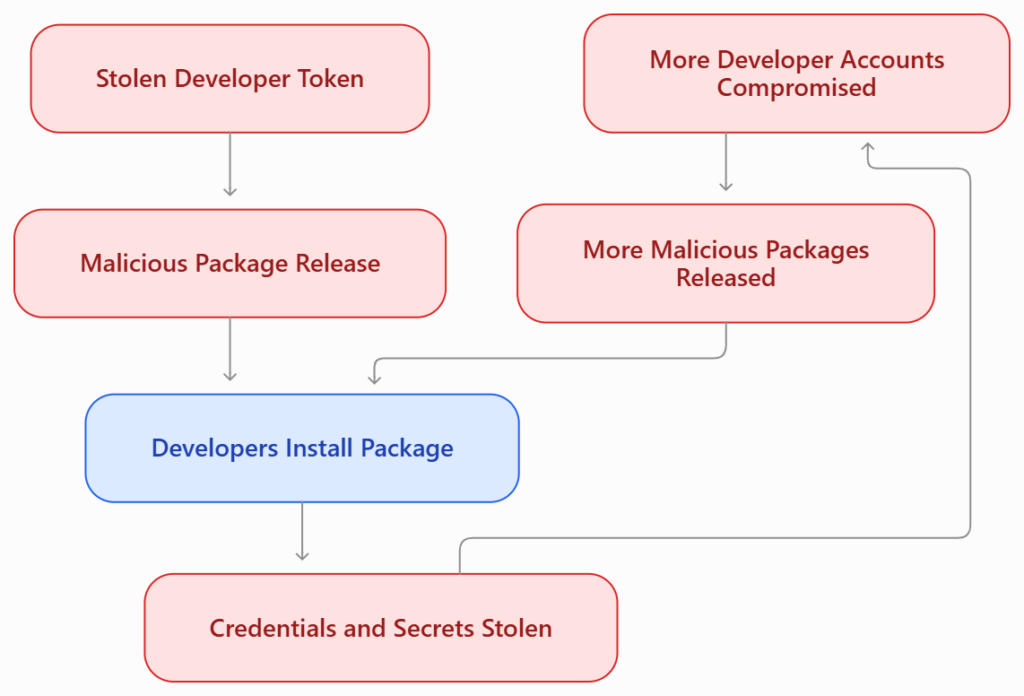
The answer is several layers, so that one failure does not become a breach.
The developer checklist
1. Lock and pin your dependencies
- Commit your lockfile (package-lock.json, pnpm-lock.yaml, yarn.lock, or a Python lockfile), and install from it in CI with a clean install command such as
npm ci. - Pin exact versions for important dependencies, and review dependency changes in pull requests.
- In Python, pin versions, and use hash-checking mode for requirements where you can:
pip install --require-hashes -r requirements.txt- Pin Docker base images by digest (
image@sha256:...) and not by a moving tag such aslatest. The LiteLLM incident affected moving image tags.
2. Delay brand-new releases
Many of the malicious versions were caught within minutes or hours. A short delay before you adopt a new version removes most of the risk. The bad axios versions were live for about three hours, and a security firm flagged the tensorlake release 11 minutes after it was published.
- npm has a minimum release age setting, and pnpm has
minimumReleaseAge. Check the current documentation for the units and the exact name, and set it to a few days for routine updates. - Dependabot now has a default cooldown for version updates. Keep it on, and still apply real security updates quickly.
3. Keep install scripts off, and allow only what you need
Use npm v12’s defaults, where dependency install scripts are blocked, and allow only the packages that really need them. Commit your allowlist so that the team shares it. Remember that this is one layer, and not a complete fix.
4. Harden GitHub Actions
- Set the default workflow token to read-only, and grant extra permissions only in the job that needs them:
permissions:
contents: read- Pin third-party actions to a full commit hash and not a tag.
- Be very careful with the
pull_request_targettrigger. It can run with secrets, and attackers have used it to run their own code. - Use protected environments with required reviewers for releases.
- Avoid long-lived tokens in CI. Prefer short-lived credentials through OpenID Connect and trusted publishing, and use staged publishing where it is available.
- Search your repositories for unknown workflow files, such as ones with names that look like a security audit, because one 2026 campaign pushed such workflows with stolen tokens.
- Turn on release immutability for your own projects, so that published release assets cannot be swapped later.
5. Reduce the value of what an attacker can steal
- Do not keep production secrets in
.envfiles on developer laptops. - Give each app, agent and environment its own key, with spending limits for AI provider keys.
- Use hardware-backed two-factor authentication for GitHub, npm and your cloud accounts.
- Review personal access tokens and OAuth apps often, and remove those that you do not use.
- Remember that AI coding tools read the same files that stealers want. Their config folders can hold keys too.
6. Detect problems early
- Turn on secret scanning and dependency alerts, and read them.
- Watch for unexpected package versions, new maintainers and odd commits in dependencies that you rely on.
- Log and alert on unusual behaviour in CI, such as outbound connections to new domains.
If you installed an affected version
Follow this order. It matters.
- Confirm exposure. Search all lockfiles, images and build logs for the affected package and version, for the time window in which it was live.
- Isolate the machine or runner. Disconnect it, and do not keep working on it.
- Remove the malware and its persistence before you revoke tokens. Some payloads watch their stolen token, and can act, for example by wiping files, when it is revoked. Look for new startup entries, scheduled tasks, editor and AI tool config changes, and unknown files.
- Rotate credentials from a clean machine: cloud keys, GitHub and npm tokens, SSH keys, CI secrets, database passwords and AI provider keys. Rotate everything that was on the affected host, including secrets that sit in config repositories.
- Check what the attacker could have done with them: new workflows, new tokens, new collaborators, published package versions, new cloud resources, and unusual billing.
- Rebuild affected images and artefacts from clean sources, and redeploy.
- Write down the timeline, and tell your customers or users if their data may be involved.
For WordPress site owners
In October, two WordPress plugin ecosystems were hit, which shows that supply chain risk is not limited to code repositories.
- Rank Math PRO: copies of version 3.0.123 that were downloaded or auto-updated in an 11-hour window contained a self-restoring backdoor. Updating to 3.0.124 does not remove it. Treat an affected site as compromised: restore a clean backup from before the incident, and then update, and rotate credentials. Reported signs include connections to a CDN-looking domain that the plugin should not use, and new admin users whose names start with
wpsupport_. - UpdraftPlus ecosystem: stolen connection keys were reportedly used to send validly signed commands that installed backdoor plugins. Update to the fixed versions, delete the old UpdraftCentral keys on each site, review the plugin folder and the user list, and rotate your storage credentials.
What to do on any WordPress site:
- Keep automatic updates on for security fixes, but consider a delay of a day for premium plugins on busy sites, and test on a staging copy. A short delay would have avoided the 11-hour window.
- Keep tested backups, with at least one stored away from the server.
- Check files against the official checksums where possible. WP-CLI can verify core and plugins from WordPress.org. Premium plugins are not covered, so you also need file integrity monitoring.
- Review administrator accounts, scheduled tasks and unknown plugins regularly.
- Use a firewall as an extra layer, and not as a fix.
If you also run PHP yourself, see our guide to the PHP2Shell vulnerabilities and how to check whether a PHP site was hacked.
What it means for AI and ML developers
AI tooling is a favourite target, because AI provider keys are valuable, and because AI projects often pull in many fast-moving dependencies.
- Treat AI gateway, agent and SDK packages like any other critical dependency: pin them and delay upgrades.
- Give each project its own API key, set spending limits, and rotate keys on a schedule.
- Keep model provider keys out of repositories, notebooks and shared
.envfiles. - Be careful with tools that read project files and run commands. Limit what they can access.
A short checklist that you can copy
- Lockfiles committed, and installs use a clean install command
- Exact versions pinned, and Docker images pinned by digest
- A cooldown on new releases
- Install scripts off by default, with a small allowlist
- GitHub Actions: read-only token, pinned actions, careful with
pull_request_target, protected release environments - No long-lived tokens in CI, and hardware-backed 2FA on key accounts
- Separate, limited keys for each app, and spending caps on AI keys
- Secret scanning on, and unknown workflows searched for
- Backups tested, and a written plan for the order of clean-up and rotation
FAQs
What is a software supply chain attack?
It is an attack that targets the software, tools or services that you depend on, such as a package, a plugin, a build pipeline or an update server, in order to reach you.
What is Mini Shai-Hulud?
It is the name given to a family of self-spreading malware that steals credentials, especially npm tokens, and then uses them to publish malicious versions of other packages. Several waves appeared in 2026.
Is npm safe to use?
npm remains widely used, and it has added protections in 2026, but no registry is risk-free. Use lockfiles, pinning, delays and least-privilege CI, and do not trust any new version blindly.
Does disabling install scripts protect me?
It helps, but it does not stop malware that runs on import, or at Python startup. Use it with the other layers.
What is provenance, and does it mean a package is safe?
Provenance records where and how a package was built. It does not prove that the build was not compromised, as some 2026 incidents showed.
I installed LiteLLM 1.107.0. What should I do?
Pin to 1.106.2, isolate the affected machine or container, remove the malware, rebuild your images, and rotate every credential that was available in the environment, using a clean machine. Check the official LiteLLM advisory for the latest steps.
Should I turn off WordPress auto-updates?
Not for security fixes on most sites. A better approach is to stage updates for premium plugins, keep backups, and monitor for changes. This is a trade-off that depends on your site.
How can I tell if a package is malicious?
Check for a new maintainer, a sudden version bump, unusual install or import behaviour, new network connections, and advisories in the GitHub advisory database. Security tools can help, but none is perfect.
Do you need help?
If you want a second pair of eyes on your dependencies, your CI pipeline or your WordPress site, talk to Infovistar. And if you found this useful, share it with the developer or site owner who most needs it.
This article reflects public reports as of October 31, 2026. Incident details, version numbers and counts can change as investigations continue, so check the official advisories before you act. It is general information, not a substitute for professional incident response.