



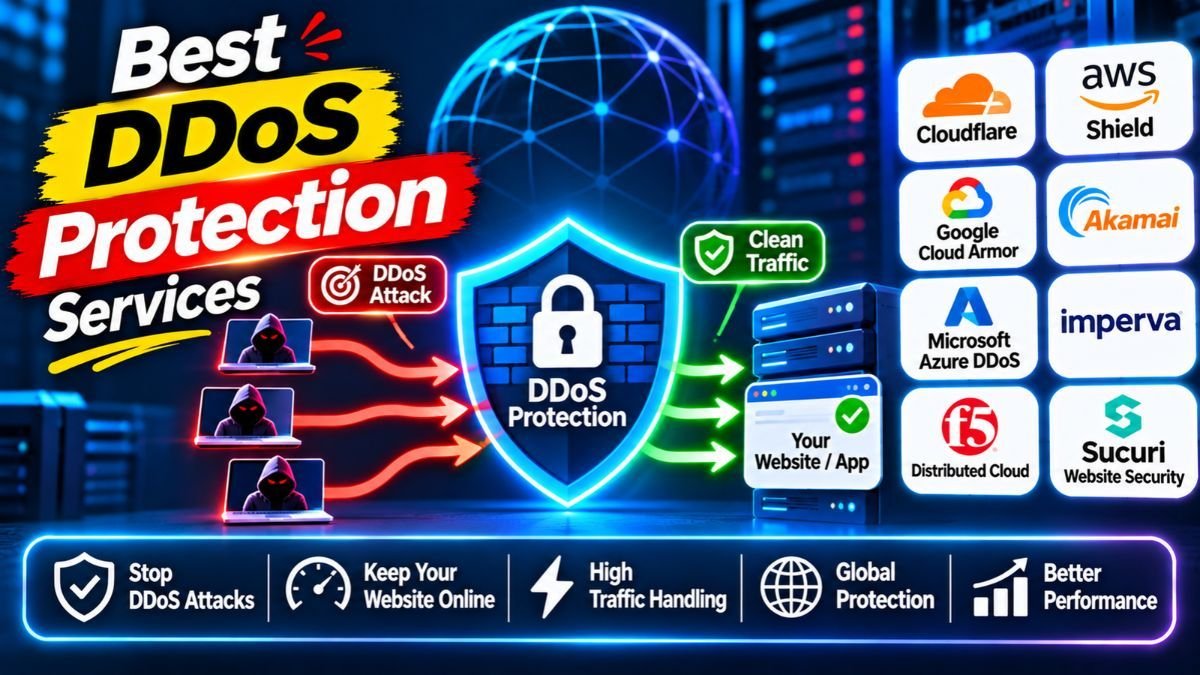
A DDoS protection service keeps your website online when attackers flood it with fake traffic. In 2026, Cloudflare is the easiest and most predictable choice for most websites, AWS Shield and Azure DDoS Protection fit apps that live in those clouds, and Akamai Prolexic and Imperva serve large enterprises. Attacks are now more frequent, shorter and smaller on average, so protection must be always on. This guide explains the options in simple words, with current attack data, prices and a checklist to choose well.
Quick answer: which DDoS protection should you choose?
| Your situation | Good first choice |
|---|---|
| Blog, small business site or online store | Cloudflare (free or paid plan) |
| WordPress or small business site that wants simple managed security | Sucuri |
| App running on AWS | AWS Shield (Standard is free; Advanced is paid) |
| App running on Microsoft Azure | Azure DDoS Protection |
| App running on Google Cloud | Google Cloud Armor |
| Bank, gaming or very large e-commerce site | Akamai Prolexic or Imperva |
| Sites with flash sales and sudden traffic spikes | Radware |
| Engineering teams that want visibility and speed | Fastly |
| Companies that already run F5 | F5 (patch carefully) |
Want weekly cybersecurity guides in simple language? Join the Infovistar WhatsApp channel and get new security tutorials as they publish.
Table of contents
- What is a DDoS attack?
- DDoS in 2026: what the latest data shows
- Signs your site is under attack
- The 10 services at a glance
- The 10 best DDoS protection services, explained
- DDoS protection pricing
- How to choose in 7 steps
- What to do during an attack
- A simple prevention checklist
- Common mistakes to avoid
- FAQs
What is a DDoS attack?
DDoS stands for distributed denial of service. Attackers use thousands or even millions of infected devices, called a botnet, to send so much traffic that your site slows down or goes offline. Real visitors cannot get in.
There are three main types:
| Type | What it does | Simple example |
|---|---|---|
| Volumetric | Fills your internet connection with huge amounts of data | A river of water flooding a small pipe |
| Protocol | Abuses how network connections work to exhaust servers or firewalls | Many fake phone calls that never hang up |
| Application layer (Layer 7) | Sends many requests that look real, such as repeated page loads or logins | Thousands of fake shoppers crowding one checkout |
DDoS attacks are illegal. Never use “booter” or “stresser” services, even as a joke or a test. They are crimes in many countries, including India.
DDoS in 2026: what the latest data shows
The picture changed a lot this year, and it matters when you choose protection.
- Record size in late 2025. Cloudflare reported a record 31.4 Tbps attack in November 2025. It lasted only about 35 seconds and came from the Aisuru and Kimwolf botnet, which used infected home routers and Android TV boxes. Cloudflare counted 47.1 million DDoS attacks in 2025, up 121% from 2024.
- Law enforcement hit the biggest botnets. In March 2026, an international operation disrupted four large IoT botnets: Aisuru, KimWolf, JackSkid and Mossad. New variants are still appearing.
- Giant attacks fell, but small ones exploded. Cloudflare’s Q3 2026 report, published on October 29, 2026, says attacks above 1 Tbps dropped from 805 in Q2 to 251 in Q3, a fall of about 69%. At the same time, network-layer attacks reached 18.2 million in the quarter, which is about one every 0.44 seconds and 208% more than a year earlier.
- Most attacks are short. About 96% of those network attacks lasted under 10 minutes, and 98% stayed under 1 Gbps.
- India is a target. India was among the ten most attacked countries in Cloudflare’s late-2025 data.
What this means for you: you need protection that works automatically and instantly, not a service that waits for you to call for help. A short burst can still take a small server offline.
Signs your site is under attack
- Your site suddenly becomes very slow or shows errors such as 503
- Huge traffic from a few countries or from the same type of request
- Your hosting provider warns you about unusual traffic or suspends your account
- Server or bandwidth use spikes without a marketing campaign
- Login pages or search pages get thousands of requests a minute
- Other services on the same network also stop working
Check your hosting dashboard, server logs and analytics. If you are unsure, contact your host right away.
The 10 services at a glance
| # | Service | Best for | Always-on? | Free option | Pricing style |
|---|---|---|---|---|---|
| 1 | Cloudflare | Most websites | Yes | Yes | Flat plans; enterprise quote |
| 2 | Sucuri | WordPress and small business sites | Yes | No | Monthly plans |
| 3 | AWS Shield | AWS apps | Yes | Standard is free | Advanced is a monthly commitment plus usage |
| 4 | Azure DDoS Protection | Azure apps | Yes | Basic protection included | Paid tiers |
| 5 | Google Cloud Armor | Google Cloud apps | Yes | No | Policy and usage fees |
| 6 | Akamai Prolexic | Large enterprises and networks | Yes or on-demand | No | Contract |
| 7 | Imperva | Regulated enterprises | Yes | Trial | Quote |
| 8 | Radware | Flash-sale and gaming sites | Yes | Trial | Quote |
| 9 | Fastly | Developer-led teams | Yes | Trial | Quote |
| 10 | F5 | Large F5 customers | Yes | Trial | Quote |
Pricing models change often. Always confirm on the vendor’s website.
The 10 best DDoS protection services, explained
1. Cloudflare: best for most websites
Cloudflare sits in front of your site. You point your domain’s DNS to it, and it filters attack traffic before it reaches your server. Its free plan includes DDoS protection that is not charged by attack size, and paid plans add more rules and tools. It publicly reported mitigating the record 31.4 Tbps attack without needing manual help.
Good for: almost any site, from a blog to a global business. Watch out for: advanced logging and API tools sit in higher plans, and you rely on one provider as your front door.
2. Sucuri: best for simple managed protection
Sucuri is a website security service that combines a cloud firewall, malware scanning, cleanup help and DDoS mitigation. It is popular with WordPress owners who want one service to handle security.
Good for: small business sites. Watch out for: plans are per site, so costs add up for many sites.
3. AWS Shield: best for apps on AWS
AWS Shield Standard is automatically included for all AWS customers at no extra charge. Shield Advanced adds stronger detection, access to AWS’s response team and cost protection that can credit you for usage spikes caused by an attack. Advanced is commonly cited at about $3,000 a month on a one-year commitment plus data fees, so check the current price.
Good for: organisations with most of their systems on AWS. Watch out for: it only covers AWS resources.
4. Azure DDoS Protection: best for apps on Microsoft Azure
Azure DDoS Protection watches traffic to your Azure virtual networks and tunes itself to your normal traffic. Basic protection is included for Azure, and paid tiers add extra features and support. For website attacks at Layer 7, pair it with Azure WAF.
Good for: Azure-first companies. Watch out for: it protects Azure resources only, and tier pricing is not simple, so read the current price page.
5. Google Cloud Armor: best for apps on Google Cloud
Cloud Armor works with Google’s load balancers to filter traffic and absorb DDoS attacks at Google’s edge, and it includes WAF rules. Check its current tiers and pricing before you buy.
Good for: teams running on Google Cloud. Watch out for: it is tied to Google’s cloud.
6. Akamai Prolexic: best for large enterprises and whole networks
Prolexic uses dedicated scrubbing centers and a 24/7 security team. It can protect entire network ranges, not only websites, which matters for banks, gaming platforms and telecom companies.
Good for: organisations where an hour of downtime costs a lot. Watch out for: enterprise contracts and a longer set-up.
7. Imperva: best for contracts and compliance
Imperva, now part of Thales, offers DDoS protection with a clear time-to-mitigate promise in its service terms, plus WAF and bot protection. This suits regulated industries that need written guarantees.
Good for: banks, healthcare and large enterprises. Watch out for: premium pricing; read the exact SLA wording.
8. Radware: best for sites with sudden traffic spikes
Radware focuses on behavior-based detection, which learns your normal patterns so a flash sale or ticket launch is less likely to be mistaken for an attack. It offers cloud and on-site options.
Good for: retail, ticketing and gaming. Watch out for: a smaller market share and a more traditional console.
9. Fastly: best for developer-led teams
Fastly combines edge delivery, DDoS protection and its Next-Gen WAF, with strong real-time visibility and settings you can manage as code.
Good for: engineering teams already using Fastly. Watch out for: pricing by quote, and value depends on using Fastly’s delivery network.
10. F5: best for companies already on F5
F5 offers DDoS protection on its BIG-IP appliances and in its cloud service. It suits large teams that already run F5 for load balancing and application security.
Important note: in October 2025, F5 disclosed that a nation-state attacker broke into its development systems and stole BIG-IP source code and information about vulnerabilities. The US agency CISA issued Emergency Directive 26-01 on urgent patching. If you use F5, keep all products updated and follow F5’s guidance.
Good for: large F5 customers. Watch out for: cost, complexity and the need to patch quickly.
Also consider: regional providers with strong Asia-Pacific coverage, such as CDNetworks and Nexusguard, and your own internet provider or hosting company, which may offer basic DDoS filtering. Ask what they include.
Worried about downtime on your website? Contact Infovistar for help with hosting, protection and a website security review.
DDoS protection pricing
| Model | How you pay | Examples | Good to know |
|---|---|---|---|
| Free or included | $0 | Cloudflare Free, AWS Shield Standard, Azure basic protection | Fine for small sites; fewer support options |
| Flat monthly plan | Fixed price per site | Cloudflare paid plans, Sucuri | Easy to predict; advanced features cost more |
| Monthly commitment plus usage | A fixed fee plus data fees | AWS Shield Advanced | Often includes cost protection; check minimum terms |
| Contract or quote | Annual agreement | Akamai, Imperva, Radware, Fastly, F5 | Usually for larger organisations |
Ask these questions before you pay:
- Is protection always on, or do I have to switch it on during an attack?
- Will my bill go up if I get a very large attack?
- What is the promised time to stop an attack, and what do I get if it is missed?
- Does it cover websites, DNS and whole networks, or only some of them?
- Are there locations or filtering centers near my visitors, especially in India?
How to choose in 7 steps
- Find out what you must protect. Website, API, DNS, mail server or a whole network?
- Choose always-on protection. With so many short attacks, waiting for manual action is too slow.
- Check the bill during attacks. Prefer pricing that does not punish you for being attacked.
- Match your hosting. Use your cloud’s own service if everything lives in one cloud, or a CDN-based service for most websites.
- Cover more than traffic floods. Add a WAF and bot protection for Layer 7 attacks. See our guide to the best web application firewalls.
- Check support. Chat or phone in your time zone and a clear plan for emergencies.
- Test it, with permission. Only run authorised tests, and ask your provider first because cloud providers have rules about testing.
What to do during an attack
- Stay calm and confirm it is an attack, not a successful marketing campaign.
- Call your host or protection provider and share what you see: start time, error messages and traffic patterns.
- Turn on stricter protection such as “under attack” modes, rate limits and bot challenges if your service offers them.
- Protect your origin server. Make sure your hosting accepts web traffic only from your protection service, so attackers cannot bypass it.
- Keep a record: screenshots, logs and times.
- Tell your team and customers with a short status message on social media or a status page.
- Report it. In India, report cyber incidents to CERT-In and consider filing a complaint at cybercrime.gov.in. Ask a legal adviser about reporting rules that apply to your organisation.
- Review afterwards. What worked, what failed and what to fix.
A simple prevention checklist
- Put your site behind a CDN or DDoS protection service
- Hide your real server address and lock your host to accept traffic only from your protection service
- Use a WAF and rate limits on login and search pages
- Keep your CMS, plugins and server software updated; see our guides to how to check if your PHP website was hacked and PHP2Shell vulnerabilities
- Have a backup and a way to switch to a simple static page
- Keep an emergency contact list for your host and providers
- Secure your own devices and IoT gadgets so they are not used in botnets: change default passwords and update router firmware
- Learn which tools you can legally use to test your own defenses; see our guide to ethical hacking tools
Ready to protect your site? Start with a free Cloudflare or cloud-provider plan, then contact Infovistar if you want set-up help or a security review.
Common mistakes to avoid
- Relying only on your hosting provider’s basic protection
- Choosing on-demand protection for a business that cannot afford even a few minutes of downtime
- Leaving the real server address public so attackers can go around the protection
- Ignoring Layer 7 attacks and having no WAF or rate limits
- Not checking what happens to your bill during an attack
- Never testing your response plan
- Forgetting that your own smart devices can be part of a botnet
For more security reading, see our guides on software supply chain attacks, how to identify a fake text message and OTP scams in India.
FAQs
What is the best DDoS protection service in 2026?
There is no single best one. Cloudflare is the best starting point for most websites because it is easy, always on and has a free plan. AWS Shield and Azure DDoS Protection fit apps in those clouds, and Akamai Prolexic and Imperva suit large enterprises.
What is a DDoS attack?
A DDoS attack floods a website or network with traffic from many infected devices so that real visitors cannot get in. Attacks can fill your bandwidth, overload your servers or flood a single page or login.
Is free DDoS protection enough?
For small sites, often yes. Cloudflare’s free plan and AWS Shield Standard cover many common attacks. Paid plans add support, guarantees, advanced rules and more detailed reports, which matter once downtime costs real money.
How big are DDoS attacks in 2026?
The largest publicly reported attack was 31.4 Tbps in November 2025. In Q3 2026, Cloudflare reported that attacks above 1 Tbps fell to 251 from 805 in Q2, while total network-layer attacks rose to 18.2 million.
Why are DDoS attacks getting shorter?
Attackers use short bursts that are hard to spot and cheap to run. Cloudflare reports that about 96% of network-layer attacks in Q3 2026 lasted under 10 minutes. This is why always-on, automatic protection matters.
What is the difference between DDoS protection and a WAF?
DDoS protection stops floods of traffic that try to overwhelm your resources. A WAF inspects web requests and blocks attacks such as SQL injection. Most big vendors sell both. See our guide to the best web application firewalls.
Do I need DDoS protection if I use a CDN?
A CDN helps absorb some traffic, but it does not replace dedicated protection. Many CDN providers include DDoS protection, so check what your plan covers, including Layer 7 and DNS protection.
How much does DDoS protection cost?
It ranges from free (Cloudflare Free, AWS Shield Standard) to flat monthly plans, to commitments such as AWS Shield Advanced at about $3,000 a month, and contract pricing for large enterprises. Always ask whether your bill rises during a big attack.
Can a DDoS attack hack my website?
A DDoS attack usually takes a site offline rather than steal data. But attackers sometimes use DDoS as a distraction while they try something else, so check your logs and keep software updated.
What should I do if my website is under DDoS attack?
Confirm it is an attack, contact your host or protection provider, turn on stricter protection, make sure your real server only accepts traffic from the protection service, keep logs and report it. In India, report to CERT-In and consider cybercrime.gov.in.
Is it legal to test my own DDoS protection?
Only with permission. Cloud providers such as AWS and Azure have rules and approved partners for testing, and testing someone else’s system without permission is a crime. Ask your provider first, and never use booter or stresser services.
Can my smart devices be used in DDoS attacks?
Yes. Many large botnets are made of infected routers, cameras and Android TV boxes. Change default passwords, update firmware and avoid cheap unbranded devices without updates.
How fast should DDoS protection react?
Automatically and within seconds. Because many attacks last only minutes, always-on protection is better than a service that waits for you to switch it on.
Do small websites really get DDoS attacks?
Yes. Attackers target small sites too, for fun, for extortion or because they share a server with a bigger target. Basic protection is cheap and worth setting up.
Final thoughts
DDoS attacks are getting more frequent, shorter and harder to spot, even as the very largest ones have eased after law enforcement took down major botnets. You do not need a giant budget to be ready. Start with always-on protection from a CDN or your cloud, lock down your server, add a WAF and keep a simple plan for emergencies. Then test it, with permission, so you know it works before you need it.
Your next step: Join the Infovistar WhatsApp channel for new cybersecurity guides, read our guide to the best web application firewalls and contact us if your website needs protection.
Attack data and prices were checked on November 4, 2026 against recent reports and vendor information. Plans, prices and statistics change often, so confirm on each vendor’s site. This article is for education and defence only and does not replace professional security or legal advice.