





Close Menu
InfovistarInfovistar
  • AI & ML
  • Cybersecurity
  • Money
    • Personal Finance
  • Insights
    • Tech News
    • Tech Tips
    • Startup
    • Web Development
    • AWS and Cloud
    • Technology
  • Courses
    • Machine Learning
      • Python Tutorial
      • TensorFlow Tutorial
      • OpenCV
    • DSA
      • Data Structures
    • Web Development
      • PHP Tutorial
      • CodeIgniter Tutorial
      • CodeIgniter 4 Tutorial
      • CodeIgniter 4 AJAX
      • JavaScript
    • Mobile App Development
      • Android Tutorial
  • Tools
    • Beautifier
      • HTML Beautifier
      • JavaScript Beautifier
      • CSS Beautifier
    • Online Compilers
      • Python Compiler
      • Java Compiler
      • JavaScript Editor
      • PHP Compiler
      • C++ Compiler
      • C Compiler
    • Image Optimization
      • Image Compressor
      • JPEG to PNG
      • PNG to JPEG
      • WebP to PNG
Trending News
AI-Powered Cyberattacks in 2026 How Hackers Use AI Agents

AI-Powered Cyberattacks in 2026: How Hackers Use AI Agents

November 21, 2026
US Outage Wave_ Microsoft, FAA, Banks, Apple-compressed

US Outages Explained: What Happened to Microsoft, FAA and Banks

November 18, 2026
Microsoft 365 Outage_ Outlook, Teams and Copilot Down. What We Know

Microsoft 365 Outage: Outlook, Teams and Copilot Down. What We Know

November 13, 2026
Facebook X (Twitter) Instagram
Sunday, November 22
Trending
  • AI-Powered Cyberattacks in 2026: How Hackers Use AI Agents
  • US Outages Explained: What Happened to Microsoft, FAA and Banks
  • Microsoft 365 Outage: Outlook, Teams and Copilot Down. What We Know
  • Diwali Online Shopping Scams 2026: 10 Ways to Stay Safe
  • 10 Best DDoS Protection Services for 2027
  • 12 Best Web Application Firewalls (WAF) for 2027
  • Best Ethical Hacking Tools in 2027: Free & Paid Picks
  • Software supply chain attacks 2026: Timeline and developer checklist
Facebook X (Twitter) Instagram Pinterest LinkedIn WhatsApp
InfovistarInfovistar
  • AI & ML
  • Cybersecurity
  • Money
    • Personal Finance
  • Insights
    • Tech News
    • Tech Tips
    • Startup
    • Web Development
    • AWS and Cloud
    • Technology
  • Courses
    • Machine Learning
      • Python Tutorial
      • TensorFlow Tutorial
      • OpenCV
    • DSA
      • Data Structures
    • Web Development
      • PHP Tutorial
      • CodeIgniter Tutorial
      • CodeIgniter 4 Tutorial
      • CodeIgniter 4 AJAX
      • JavaScript
    • Mobile App Development
      • Android Tutorial
  • Tools
    • Beautifier
      • HTML Beautifier
      • JavaScript Beautifier
      • CSS Beautifier
    • Online Compilers
      • Python Compiler
      • Java Compiler
      • JavaScript Editor
      • PHP Compiler
      • C++ Compiler
      • C Compiler
    • Image Optimization
      • Image Compressor
      • JPEG to PNG
      • PNG to JPEG
      • WebP to PNG
InfovistarInfovistar
Home » Fake Google Chrome Spreads ValleyRAT Malware via DLL Hijack
Cybersecurity

Fake Google Chrome Spreads ValleyRAT Malware via DLL Hijack

InfovistarBy InfovistarFebruary 7, 20255 Mins Read
Share Facebook Twitter Pinterest LinkedIn Tumblr Reddit Telegram Email
Fake Google Chrome Spreads ValleyRAT Malware via DLL Hijack
Share
Facebook Twitter LinkedIn Pinterest Email

Cybercriminals always find new ways to target unsuspecting users. Fake Google Chrome websites are their latest tool for spreading ValleyRAT malware. This dangerous malware first appeared in 2023. A group called Silver Fox often targets Chinese-speaking regions like Hong Kong, Taiwan, and Mainland China.

These hackers focus on high-value positions such as finance, accounting, and sales. They aim to steal sensitive data by using a technique called DLL hijacking. This article will explain how they do it and how you can protect yourself from such attacks.

What is ValleyRAT Malware?

ValleyRAT is a remote access trojan (RAT) written in C++. It can monitor screens, log keystrokes, and maintain persistence. It communicates with a remote server to execute harmful tasks. Attackers use this malware to control infected systems and steal sensitive information.

Attackers often distribute ValleyRAT with other dangerous malware like Purple Fox and Gh0st RAT. Chinese hacking groups commonly use these malware families for data theft.

How Fake Chrome Sites Spread ValleyRAT

Attackers use fake Google Chrome websites to lure users into downloading malware. These websites appear legitimate but contain a malicious installer. When a user searches for Chrome, they may land on one of these fake sites and download a ZIP file.
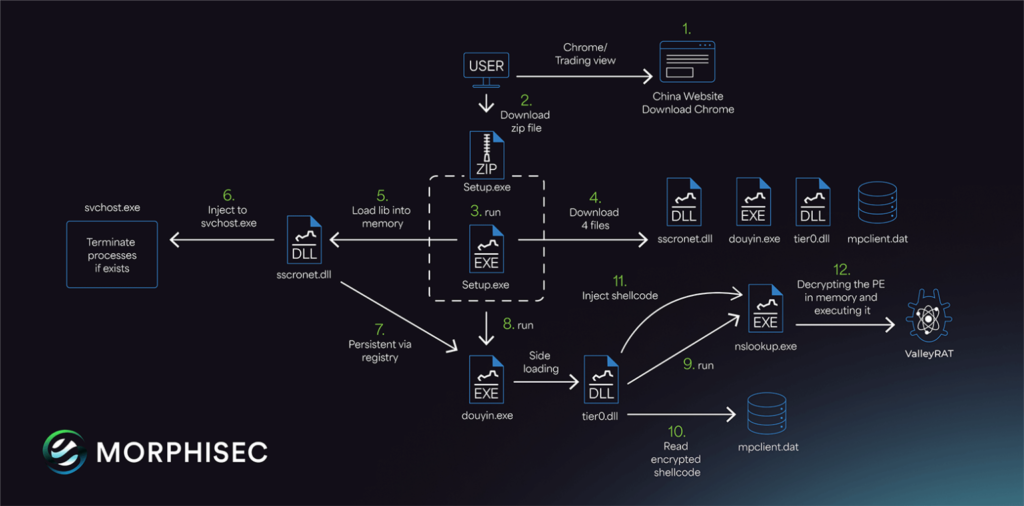
ValleyRAT Infection Chain

The ZIP file contains an executable named “Setup.exe.” Once executed, it downloads four additional payloads, including a legitimate application named Douyin.exe (Chinese TikTok version). This app is used to sideload a rogue DLL called tier0.dll, which launches ValleyRAT.

Another DLL file, sscronet.dll, terminates specific processes to ensure the malware stays hidden. This sneaky approach makes detection difficult for antivirus programs.

DLL Hijacking: How Attackers Bypass Security

DLL hijacking is a method where attackers trick the system into loading a malicious DLL file instead of a legitimate one. In the ValleyRAT attack, they use signed executables that are vulnerable to DLL search order hijacking.

The malicious DLL is executed along with the legitimate application. This allows the malware to perform harmful activities without raising alarms.

Also read | Hackers Use Fake Google Ads to Steal Microsoft Accounts

Targeting High-Value Positions

Silver Fox focuses on key roles within organizations. Their primary targets are finance, accounting, and sales departments. People in these positions often have access to critical business data.

Morphisec researchers noticed that attackers carefully plan these attacks. They aim to infiltrate organizations and steal sensitive information without detection.

Drive-By Download Scheme

The links to fake Chrome sites are mostly shared through drive-by download schemes. In this method, users searching for Chrome are directed to these malicious sites. They unknowingly download the fake installer, trusting it as legitimate software.

This tactic works because users believe they are downloading the actual Chrome browser. Unfortunately, this mistake allows malware to infect their devices.

How ValleyRAT Works After Infection

Once ValleyRAT infects a system, it performs several malicious tasks:

  1. Monitoring screen content – The malware captures what’s displayed on the user’s screen.
  2. Keystroke logging – It records every keystroke, including sensitive information like passwords.
  3. Process enumeration – ValleyRAT scans for active processes and terminates specific ones to avoid detection.
  4. Payload injection – The malware downloads and executes additional malicious DLLs and binaries.
  5. Persistence – It ensures it remains active on the infected system.

This malware communicates with a remote server to receive further instructions. This gives attackers full control over the compromised system.

Also read | Fake CAPTCHA Spreads Lumma Stealer in Multi-Industry Attacks

Connection to Gh0st RAT and PNGPlug

The ValleyRAT campaign is similar to previous attacks using Gh0st RAT. These earlier attacks also used fake Chrome installers to distribute malware.

The recent attacks involve a DLL loader called PNGPlug. This loader helps deploy ValleyRAT and other malware. Researchers found evidence connecting these campaigns, indicating that the same group is behind them.

Real-World Example

Morphisec CTO Michael Gorelik confirmed that fake Chrome installer sites were used to distribute Gh0st RAT in earlier attacks. He also shared that the recent attacks specifically targeted Chinese-speaking users.

These attackers used Chinese-language web lures to trick victims into downloading the malware. The setup binary checks for administrator privileges before executing its tasks. This sophisticated approach ensures the malware operates efficiently.

How to Stay Safe

You can protect yourself by following these simple steps:

  1. Download software only from official websites.
    Always visit official websites like google.com to download applications. Avoid third-party sites.
  2. Use antivirus software.
    Reliable antivirus software can detect and block malicious installers. Keep it updated.
  3. Be cautious of drive-by downloads.
    Do not click on unknown links. Avoid downloading files from unfamiliar sources.
  4. Regularly update your system.
    Security updates fix vulnerabilities that malware can exploit.
  5. Monitor unusual behavior on your system.
    If your system behaves strangely, scan it for malware immediately.

Conclusion

ValleyRAT malware is a growing threat. Cybercriminals use fake Google Chrome sites and DLL hijacking to infect users’ systems. These attacks are sophisticated and carefully targeted.

Protect yourself by downloading software only from trusted sources. Stay alert and follow cybersecurity best practices. With the right precautions, you can avoid falling victim to these harmful attacks.


DLL Hijacking Fake Google Chrome ValleyRAT
Share. Facebook Twitter Pinterest LinkedIn Tumblr Email
Previous ArticleWhat’s OmniHuman-1? AI tool makes videos from a single photo
Next Article DeepSeek App Transmits Sensitive User Data Without Encryption
Infovistar
  • Website
  • Facebook
  • X (Twitter)
  • Instagram
  • LinkedIn

Related Posts

AI-Powered Cyberattacks in 2026 How Hackers Use AI Agents
Cybersecurity

AI-Powered Cyberattacks in 2026: How Hackers Use AI Agents

November 21, 2026
US Outage Wave_ Microsoft, FAA, Banks, Apple-compressed
Cybersecurity

US Outages Explained: What Happened to Microsoft, FAA and Banks

November 18, 2026
Microsoft 365 Outage_ Outlook, Teams and Copilot Down. What We Know
Cybersecurity

Microsoft 365 Outage: Outlook, Teams and Copilot Down. What We Know

November 13, 2026
Add A Comment

Comments are closed.

Blog Categories
  • AI and ML (106)
  • Android (4)
  • AWS and Cloud (9)
  • Cybersecurity (85)
  • Money (12)
  • Personal Finance (6)
  • Startup (37)
  • Tech News (82)
  • Tech Tips (28)
  • Technology (73)
  • Web Development (25)
Top Posts
Google is rolling out Identity Check Feature to Android 15

Google is rolling out Identity Check Feature to Android 15

January 25, 20252,375 Views
How to Integrate Google Gemini to WhatsApp

How to Use Google Gemini with WhatsApp in 2026

February 16, 20241,913 Views
OpenAI Unveils Web-Based AI Agent Operator for Task Automation

OpenAI Unveils Web-Based AI Agent Operator for Task Automation

January 24, 20251,508 Views
Stay In Touch
  • Facebook
  • YouTube
  • WhatsApp
  • Twitter
  • Instagram
  • Pinterest
  • LinkedIn
Latest Articles

Subscribe to Updates

Get the latest tech news from FooBar about tech, design and biz.

About Us

Infovistar is a technology blog offering practical tutorials, programming guides, and the latest updates on AI, cybersecurity, software development, and digital technology.

Contact Information

Address: Nashik, Maharashtra, India – 422004
Email: infovistarindia@gmail.com
Phone: +91 89990 59150

Contact Us | About Us

DMCA.com Protection Status
Most Popular
AI-Powered Cyberattacks in 2026 How Hackers Use AI Agents

AI-Powered Cyberattacks in 2026: How Hackers Use AI Agents

US Outage Wave_ Microsoft, FAA, Banks, Apple-compressed

US Outages Explained: What Happened to Microsoft, FAA and Banks

Microsoft 365 Outage_ Outlook, Teams and Copilot Down. What We Know

Microsoft 365 Outage: Outlook, Teams and Copilot Down. What We Know

Our Picks
Binance Hack: $6.3 Billion Stolen, Largest Crypto Heist Ever

This Site Uses XSLT Chrome Warning Explained: How to Fix It

iPad mini OLED Price in India

iPad mini OLED Price in India: Wi-Fi & Cellular Variants, Offers

iMac M6 Price in India

iMac M6 Price in India: All Variants, Colors, Offers and Release Date

Facebook X (Twitter) Instagram Pinterest YouTube LinkedIn
  • About Us
  • Contact Us
  • Tools
  • Terms & Conditions
  • Privacy Policy
  • AdSense Disclaimer
© 2026 Infovistar. Designed and Developed by Infovistar.

Type above and press Enter to search. Press Esc to cancel.

Ad Blocker Enabled!
Ad Blocker Enabled!
Our website is made possible by displaying online advertisements to our visitors. Please support us by disabling your Ad Blocker.