



Close Menu
InfovistarInfovistar
  • AI & ML
  • Cybersecurity
  • Money
    • Personal Finance
  • Insights
    • Tech News
    • Tech Tips
    • Startup
    • Web Development
    • AWS and Cloud
    • Technology
  • Courses
    • Machine Learning
      • Python Tutorial
      • TensorFlow Tutorial
      • OpenCV
    • DSA
      • Data Structures
    • Web Development
      • PHP Tutorial
      • CodeIgniter Tutorial
      • CodeIgniter 4 Tutorial
      • CodeIgniter 4 AJAX
      • JavaScript
    • Mobile App Development
      • Android Tutorial
  • Tools
    • Beautifier
      • HTML Beautifier
      • JavaScript Beautifier
      • CSS Beautifier
    • Online Compilers
      • Python Compiler
      • Java Compiler
      • JavaScript Editor
      • PHP Compiler
      • C++ Compiler
      • C Compiler
    • Image Optimization
      • Image Compressor
      • JPEG to PNG
      • PNG to JPEG
      • WebP to PNG
Trending News
US Outage Wave_ Microsoft, FAA, Banks, Apple-compressed

US Outages Explained: What Happened to Microsoft, FAA and Banks

November 18, 2026
Microsoft 365 Outage_ Outlook, Teams and Copilot Down. What We Know

Microsoft 365 Outage: Outlook, Teams and Copilot Down. What We Know

November 13, 2026
Diwali online shopping scams warning for shoppers in India

Diwali Online Shopping Scams 2026: 10 Ways to Stay Safe

November 7, 2026
Facebook X (Twitter) Instagram
Friday, November 20
Trending
  • US Outages Explained: What Happened to Microsoft, FAA and Banks
  • Microsoft 365 Outage: Outlook, Teams and Copilot Down. What We Know
  • Diwali Online Shopping Scams 2026: 10 Ways to Stay Safe
  • 10 Best DDoS Protection Services for 2027
  • 12 Best Web Application Firewalls (WAF) for 2027
  • Best Ethical Hacking Tools in 2027: Free & Paid Picks
  • Software supply chain attacks 2026: Timeline and developer checklist
  • Binance Hack: $6.3 Billion Drained in the Largest Crypto Theft Ever. What We Know So Far
Facebook X (Twitter) Instagram Pinterest LinkedIn WhatsApp
InfovistarInfovistar
  • AI & ML
  • Cybersecurity
  • Money
    • Personal Finance
  • Insights
    • Tech News
    • Tech Tips
    • Startup
    • Web Development
    • AWS and Cloud
    • Technology
  • Courses
    • Machine Learning
      • Python Tutorial
      • TensorFlow Tutorial
      • OpenCV
    • DSA
      • Data Structures
    • Web Development
      • PHP Tutorial
      • CodeIgniter Tutorial
      • CodeIgniter 4 Tutorial
      • CodeIgniter 4 AJAX
      • JavaScript
    • Mobile App Development
      • Android Tutorial
  • Tools
    • Beautifier
      • HTML Beautifier
      • JavaScript Beautifier
      • CSS Beautifier
    • Online Compilers
      • Python Compiler
      • Java Compiler
      • JavaScript Editor
      • PHP Compiler
      • C++ Compiler
      • C Compiler
    • Image Optimization
      • Image Compressor
      • JPEG to PNG
      • PNG to JPEG
      • WebP to PNG
InfovistarInfovistar
Home » WhatsApp introduces Passkeys to unlock your encrypted backups
Technology

WhatsApp introduces Passkeys to unlock your encrypted backups

InfovistarBy InfovistarAugust 29, 20243 Mins Read
Share Facebook Twitter Pinterest LinkedIn Tumblr Reddit Telegram Email
WhatsApp introduces Passkeys to unlock your encrypted backups
Share
Facebook Twitter LinkedIn Pinterest Email

WhatsApp is rolling out an exciting new update for Android users through the Google Play Beta Program with version 2.24.18.13. This update introduces a groundbreaking feature called passkeys that simplifies how you access your encrypted backups. In simple terms, this new feature will let you unlock your backups with just a fingerprint or facial recognition, making it more secure and user-friendly.

Why is the WhatsApp Passkey Feature Important for You?

WhatsApp has offered two ways to protect your backups: a custom password or a complex 64-digit encryption key. While these methods are very secure, they can be hard to remember and can sometimes cause frustration. Imagine having to recall a lengthy password just to access your backups—it’s not always convenient, right? The new passkey feature solves this problem by allowing you to use easy and intuitive biometric methods.

How Do WhatsApp Passkeys Make Your Life Easier?

Think about it: instead of having to deal with complex passwords or encryption keys, you can now use your fingerprint or face to unlock your backups. This means no more scrambling to remember that complicated password you set months ago. With passkeys, you can access your data quickly, conveniently, and securely. The new passkey feature helps you save time and reduces your chance of getting locked out due to forgotten passwords.
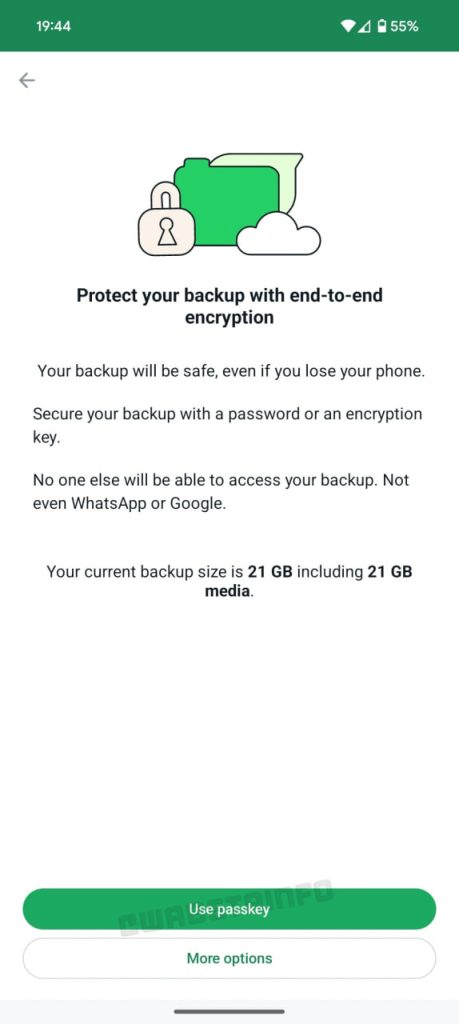
Whatsapp-passkey-for-backups

Where Will Your Passkey Be Stored?

You might be wondering how secure this new passkey system is. Well, your passkey will be securely stored in a password manager, adding another layer of protection to your backup data. This approach ensures that your passkey is safe and accessible only to you, giving you peace of mind.

When Will This Feature Be Available to Everyone?

The passkey feature for WhatsApp backups is currently in development and is expected to roll out soon. So, if you’re a part of the WhatsApp Beta Program, watch for future updates. This is just one of the many ways WhatsApp ensures its users have a smooth and secure experience when managing their encrypted backups.

Also read | Saying Goodbye to Passwords: The Simplicity of Passkey Passwordless Authentication

Key Takeaways:

  • WhatsApp’s new passkey feature makes encrypted backups easier to access and more secure.
  • You no longer need to remember complex passwords or 64-digit encryption keys.
  • Biometric authentication like fingerprints or facial recognition will be used instead.
  • Your passkey will be stored in a secure password manager for added safety.
  • The feature is currently in development, so stay tuned for updates if you’re a beta user!

FAQs

1. What is a WhatsApp passkey, and how does it work?
A WhatsApp passkey is a new feature that allows you to unlock your encrypted backups using biometric methods like fingerprints or facial recognition, making access easier and more secure.

2. Do I need to update my WhatsApp app to use passkeys?
Yes, you will need to update your WhatsApp app to the latest version available in the Google Play Beta Program to use the new passkey feature.

3. How secure are WhatsApp passkeys for encrypted backups?
WhatsApp passkeys provide high security by using biometric authentication and storing them in a password manager for added protection.

4. When will passkeys be available for all users?
The passkey feature is currently in development and will be available in a future update. Stay tuned for more information if you are a part of the WhatsApp Beta Program.

5. Can I still use a custom password if I prefer?
Yes, WhatsApp will continue to support custom passwords and encryption keys, but the new passkey feature offers a simpler and more secure option.

Also read | How to Integrate Google Gemini to WhatsApp

WhatsApp
Share. Facebook Twitter Pinterest LinkedIn Tumblr Email
Previous ArticleLeading Companies Using MLOps for AI Deployment
Next Article BharatPe Launches New UPI App: Here’s What You Need to Know!
Infovistar
  • Website
  • Facebook
  • X (Twitter)
  • Instagram
  • LinkedIn

Related Posts

Best MacBook to Buy in 2026
Technology

Best MacBook to Buy in 2026: A Simple Guide for Your Needs

January 20, 2026
WhatsApp Rolls Out AI Chat Support for Businesses
Tech News

WhatsApp Rolls Out AI Chat Support and Voice Calling for Businesses

July 2, 2025
JEE Mains Admit Card for Jan 2025 Exams Released Download Now
Technology

JEE Mains Admit Card for Jan 2025 Exams Released: Download Now

January 18, 2025
Add A Comment

Comments are closed.

Blog Categories
  • AI and ML (106)
  • Android (4)
  • AWS and Cloud (9)
  • Cybersecurity (84)
  • Money (12)
  • Personal Finance (6)
  • Startup (37)
  • Tech News (82)
  • Tech Tips (28)
  • Technology (73)
  • Web Development (25)
Top Posts
Google is rolling out Identity Check Feature to Android 15

Google is rolling out Identity Check Feature to Android 15

January 25, 20252,375 Views
How to Integrate Google Gemini to WhatsApp

How to Use Google Gemini with WhatsApp in 2026

February 16, 20241,913 Views
OpenAI Unveils Web-Based AI Agent Operator for Task Automation

OpenAI Unveils Web-Based AI Agent Operator for Task Automation

January 24, 20251,508 Views
Stay In Touch
  • Facebook
  • YouTube
  • WhatsApp
  • Twitter
  • Instagram
  • Pinterest
  • LinkedIn
Latest Articles

Subscribe to Updates

Get the latest tech news from FooBar about tech, design and biz.

About Us

Infovistar is a technology blog offering practical tutorials, programming guides, and the latest updates on AI, cybersecurity, software development, and digital technology.

Contact Information

Address: Nashik, Maharashtra, India – 422004
Email: infovistarindia@gmail.com
Phone: +91 89990 59150

Contact Us | About Us

DMCA.com Protection Status
Most Popular
US Outage Wave_ Microsoft, FAA, Banks, Apple-compressed

US Outages Explained: What Happened to Microsoft, FAA and Banks

Microsoft 365 Outage_ Outlook, Teams and Copilot Down. What We Know

Microsoft 365 Outage: Outlook, Teams and Copilot Down. What We Know

Diwali online shopping scams warning for shoppers in India

Diwali Online Shopping Scams 2026: 10 Ways to Stay Safe

Our Picks
Binance Hack: $6.3 Billion Stolen, Largest Crypto Heist Ever

This Site Uses XSLT Chrome Warning Explained: How to Fix It

iPad mini OLED Price in India

iPad mini OLED Price in India: Wi-Fi & Cellular Variants, Offers

iMac M6 Price in India

iMac M6 Price in India: All Variants, Colors, Offers and Release Date

Facebook X (Twitter) Instagram Pinterest YouTube LinkedIn
  • About Us
  • Contact Us
  • Tools
  • Terms & Conditions
  • Privacy Policy
  • AdSense Disclaimer
© 2026 Infovistar. Designed and Developed by Infovistar.

Type above and press Enter to search. Press Esc to cancel.

Ad Blocker Enabled!
Ad Blocker Enabled!
Our website is made possible by displaying online advertisements to our visitors. Please support us by disabling your Ad Blocker.