




Google Gemini is Google’s family of AI models and the AI assistant app built on them. It can chat, write, research, create images and videos, work inside Gmail and Docs, and now replaces Google Assistant on many Android phones. In 2026 you can use it free, or pay for higher limits and the strongest models. This guide explains what Gemini is, the models and plans in simple words, what is new this year, what it costs in India and how to start using it today.
Quick answer
- What it is: Google’s AI models plus the Gemini app, available on the web, Android and iPhone.
- Free plan: yes. It includes everyday chat, Deep Research, Gemini Live voice chat, Canvas and image creation, with usage limits.
- Paid plans (US prices, October 2026): Google AI Plus about $4.99 a month, AI Pro $19.99 and AI Ultra from $99.99.
- Newest model most people can use: reports describe Gemini 4 Argon, rolled out on October 13, 2026 to AI Pro and Ultra subscribers.
- New this year: Skills are replacing Gems, and Gemini is replacing Google Assistant on Android.
- Students in India: eligible university students can claim Google AI Plus free for one year if they redeem it by December 31, 2026.
Want weekly AI guides in simple language? Join the Infovistar WhatsApp channel and get new tutorials as they publish.
Table of contents
- What is Gemini?
- From Bard to Gemini: a short history
- Gemini models explained
- What Gemini can do
- Plans and prices
- Gemini in India
- How to use Gemini
- Gemini vs ChatGPT vs Claude
- Privacy and safety
- Gemini for developers
- Limits to know
- FAQs
What is Gemini?
Gemini is two things that share one name:
- Gemini the models. These are Google DeepMind’s AI models. They are “multimodal”, which means they work with text, images, audio, video and code at the same time.
- Gemini the assistant. This is the app and the features built on those models. You can chat with it, speak to it, upload files and use it inside Google products such as Gmail, Docs, Chrome and Android.
Think of the models as the engine and the Gemini app as the car you drive.
From Bard to Gemini: a short history
Our earlier article, written at launch in December 2023, described Gemini as a new model that powered the Bard chatbot, mentioned PaLM 2 and said Gemini Ultra was not yet available. Much has changed since:
| Year | What happened |
|---|---|
| 2023 | Google launched Gemini in three sizes: Nano, Pro and Ultra, and Bard began using Gemini Pro |
| 2024 | Bard was renamed Gemini, and paid plans arrived |
| 2025 and 2026 | Newer generations followed, including Gemini 3 and later models, with Flash and Pro versions, video creation with Gemini Omni and Veo and agent features |
| Autumn 2026 | Skills began replacing Gems, Gemini 4 Argon rolled out to paid users and Gemini continued to replace Google Assistant on Android |
So in 2026, “Gemini” no longer means one launch announcement. It is a whole product line that updates often.
Gemini models explained
Google’s model names and versions change quickly, and reports do not always agree on exact numbers. Here is the simple picture.
| Model type | What it is for | Who gets it |
|---|---|---|
| Flash-Lite | Fast, light everyday answers | Free plan default, according to Google’s plan page |
| Flash | Fast and capable for most tasks | AI Plus and above |
| Pro | Harder reasoning, coding and writing | AI Pro and Ultra (limited access on free in some regions) |
| Gemini 4 Argon | Google’s newest model for the hardest multi-step tasks | AI Pro and Ultra in the Gemini app, since October 13, 2026 |
| Deep Think | A slower thinking mode for hard science, maths and engineering | AI Ultra |
| Gemini Nano | A small model that runs on your phone, for offline tasks like smart replies | Supported Android and Pixel phones |
A warning about naming: “Gemini Pro” (a model) is not the same as “Google AI Pro” (a subscription). Another model named Gemini 4 Carbon was reported on October 28, 2026 for a limited group of cyber defenders, not for general users. Check Google’s release notes for the latest.
What Gemini can do
- Chat and write. Draft emails, explain topics, summarise articles, plan trips and brainstorm.
- Deep Research. Ask a big question, and Gemini searches the web and builds a longer report with sources. The free plan includes a limited number of reports.
- Gemini Live. Talk to Gemini by voice, with natural back-and-forth, on your phone.
- Canvas. A shared workspace for writing and coding, where you can edit with Gemini.
- Images and video. Create and edit pictures, and on paid plans make videos with Gemini Omni and related tools.
- Skills (replacing Gems). Saved instructions for tasks you repeat, such as a writing coach or a code reviewer. You can call a skill in a normal chat by typing a slash. Read our guide on Gems becoming Skills.
- Gemini Notebook. Upload your notes and files and ask questions about them. It is useful for students.
- Google apps. On paid plans, Gemini can work inside Gmail, Docs and other Google tools. Some plans include a Daily Brief, a morning summary from your Gmail and Calendar, in the US to start.
- Browser help. Paid plans in some countries include Chrome features where Gemini can act on web pages.
- Google Assistant replacement. Gemini is replacing Google Assistant on Android. See our guide on Google Assistant being replaced by Gemini.
- Gemini Spark. A 24/7 AI agent that works across Gmail, Docs and Calendar. As of the latest reports it is in beta for US AI Ultra subscribers, with no confirmed India date.
If you want to use Gemini inside WhatsApp, see our guide on how to use Google Gemini with WhatsApp.
Plans and prices
Prices below are US prices reported in October 2026. Google sets different prices in each country, and sources sometimes differ, so check Google’s plans page.
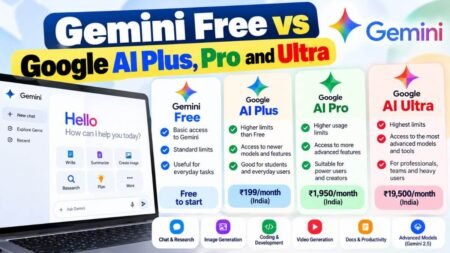
| Plan | US price per month | What you get |
|---|---|---|
| Free | $0 | Everyday chat, Deep Research (limited), Gemini Live, Canvas, image creation, 15 GB storage |
| Google AI Plus | About $4.99 (it was $7.99 earlier in 2026) | Flash model, about twice the free limits, video creation, Gemini in Gmail, 400 GB storage |
| Google AI Pro | $19.99 | Pro model and Gemini 4 Argon, about four times the free limits, Gemini in Gmail and Docs, 5 TB storage, bigger context window |
| Google AI Ultra | From $99.99, with a higher tier at $199.99 | Highest limits, Deep Think, early agent features, 20 TB or more storage, YouTube Premium |
Limits are based on compute and refresh every few hours, up to a weekly cap, so heavy users may reach them sooner on the free plan.
Which plan should you pick?
- Free: casual use, homework help, quick answers.
- AI Plus: a cheap step up if you hit free limits or want video.
- AI Pro: the usual choice for daily work, long documents and coding.
- AI Ultra: only for power users who need the top limits, Deep Think or early agents.
For a deeper comparison, see our guide to Gemini Free vs Google AI Plus, Pro and Ultra.
Want to use AI better at work or study? Contact Infovistar for AI workshops, or start free with our guide to free AI tools for students in India.
Gemini in India
- Language: Gemini can understand and answer in Hindi and several other Indian languages. Quality varies by language and topic, so test it with your own questions.
- Prices in India: one I/O 2026 coverage page lists Google AI Pro at about ₹1,699 a month and AI Ultra at ₹6,500 a month, and Google’s own student page lists AI Plus at ₹399 a month after the free year. Confirm current prices on Google’s plans page.
- Free year for students: eligible university students aged 18 and over can claim Google AI Plus free for one year. You must redeem by December 31, 2026, add a payment method and cancel before the year ends to avoid being charged ₹399 a month. See our step-by-step guide on free AI tools for students in India.
- Telecom offers: some Jio users with qualifying plans were offered months of Google AI Pro. Terms change, so check the MyJio app.
- Not yet in India: Gemini Spark, the Daily Brief and AI Inbox in Gmail were listed as US-only at launch, with no confirmed India date.
How to use Gemini: step by step
- Open Gemini. Go to gemini.google.com or open the Gemini app on Android or iPhone. On many Android phones you can also hold the power button or say “Hey Google”.
- Sign in with your Google account.
- Type or speak a clear request. For example: “Explain photosynthesis to a Class 8 student in 5 simple points.”
- Add context. Say who the answer is for, what format you want and how long it should be.
- Upload a file or photo if you want help with a document, a screenshot or a picture.
- Try Deep Research for bigger questions, or Gemini Live for talking.
- Refine. Ask follow-ups such as “make it shorter” or “give me examples”.
- Check the answer. Verify important facts, numbers and dates from a trusted source.
- Save repeat tasks as a skill so you do not retype instructions every time.
For better prompts, read our guide to prompt engineering.
Gemini vs ChatGPT vs Claude
All three are strong, and the best one depends on your tools and tasks. This is a general comparison, not a ranking.
| Gemini | ChatGPT | Claude | |
|---|---|---|---|
| Made by | OpenAI | Anthropic | |
| Best known for | Google app integration, multimodal work, video and image tools | Wide all-round assistant with a large plugin and app ecosystem | Careful writing, long documents and coding |
| Works inside | Gmail, Docs, Android, Chrome | Its own apps and integrations | Its own apps and integrations |
| Free plan | Yes | Yes | Yes |
| Good fit if you | Live in Google tools | Want a flexible general assistant | Work with long text and code |
Features and prices change often. Many people use more than one. See our guide to the best AI chatbots for business for more.
Privacy and safety
- Check your activity settings. Google lets you control whether your Gemini activity is saved and used to improve services. Review these settings in your Google account. Some newer features, such as Skills, have required Keep Activity to be turned on, according to reports.
- Do not paste sensitive data. Avoid passwords, card numbers, Aadhaar numbers and private customer data in any chatbot.
- Use work accounts carefully. Company Workspace accounts have their own admin controls and data terms.
- Check age rules. Reports say some newer features are limited to users aged 18 and over. Parents should read our guide on cybersecurity for kids.
- Watch for fakes. Scammers copy popular AI apps. Download Gemini only from the official Play Store, App Store or Google’s website.
Gemini for developers
Developers can use Gemini through the Gemini API, Google AI Studio and Google Cloud Vertex AI, and Google also offers coding tools such as Antigravity. Pricing is per token and differs from consumer plans. Gemini has a very large context window on some models, so it can read long documents and large code bases. If you want to build AI apps, learn Python first with our Python course and explore tools like Langflow.
Limits to know
- It can be wrong. Gemini may give confident but incorrect answers. Check important facts.
- Usage limits. Free and lower plans have caps that reset over time.
- Features vary by country. Some features appear first in the US.
- Names change quickly. Models, plan names and prices change often, so older articles go out of date fast.
- Privacy choices. Some features depend on settings you may want to control.
FAQs
What is Google Gemini?
Google Gemini is Google’s family of AI models and the assistant app built on them. It can chat, write, research, create images and videos, work inside Gmail and Docs, and answer by voice.
Is Gemini free?
Yes. The free plan includes everyday chat, limited Deep Research, Gemini Live, Canvas and image creation. Paid plans add higher limits, stronger models, video creation and more storage.
How much does Gemini cost?
In the US, as of October 2026, Google AI Plus is about $4.99 a month, AI Pro is $19.99 and AI Ultra starts at $99.99. Prices differ by country and change often, so check Google’s plans page.
What is the latest Gemini model?
Reports in late 2026 describe Gemini 4 Argon, rolled out on October 13, 2026 to AI Pro and Ultra subscribers, as the newest model most people can use. A limited-access model called Gemini 4 Carbon was also reported for cyber defenders. Check Google’s release notes for the latest.
What is the difference between Gemini and Bard?
Bard was Google’s earlier chatbot. It was renamed Gemini in 2024, and Gemini now refers to both the models and the assistant.
What is the difference between Gemini and Google Assistant?
Google Assistant was Google’s older voice assistant. Gemini is replacing it on Android and can do much more, such as long conversations, writing, research and working with your Google apps.
What is a Gemini Gem, and what is a Skill?
Gems were saved custom versions of Gemini for a task. Skills are saved instructions that you can call in any chat by typing a slash, and Gemini can also apply them on its own. Google is converting Gems into Skills, with personal accounts starting on November 17, 2026.
Is Gemini available in India?
Yes. The Gemini app works in India, and Google has offered Indian students a free year of AI Plus until December 31, 2026. Some newer features, such as Gemini Spark, were US-only at launch.
Can Gemini understand Hindi?
Yes. Gemini can understand and answer in Hindi and other Indian languages, though quality varies by language and topic.
Is Gemini better than ChatGPT?
Not always. Gemini is strong if you use Google tools and want image and video features. ChatGPT and Claude are strong all-round assistants. Try each on your own tasks and choose what works for you.
Is Gemini safe to use?
It is built by Google with safety features, but you should still avoid sharing sensitive data, check your activity settings and verify important answers.
How do I use Gemini on my phone?
Open the Gemini app on Android or iPhone, or on many Android phones hold the power button or say “Hey Google”. Sign in with your Google account and type or speak your request.
What is Gemini Live?
Gemini Live lets you have a voice conversation with Gemini on your phone, with natural interruptions and follow-ups. It is included on the free plan.
What is Deep Research?
Deep Research makes Gemini search many web pages and build a longer, cited report on a topic. The free plan includes a limited number each month.
What is Gemini Spark?
Gemini Spark is a 24/7 agent that works across Gmail, Docs and Calendar. As of the latest reports, it is in beta for US AI Ultra subscribers and has no confirmed India date.
Final thoughts
Gemini has grown from a launch announcement into a full set of AI tools for chatting, researching, creating and working inside Google’s apps. Start with the free plan, try Deep Research and Gemini Live, and upgrade only if you hit limits or need stronger models. If you are an Indian university student, claim the free AI Plus year before December 31, 2026. And always check important answers before you rely on them.
Your next step: Join the Infovistar WhatsApp channel for new AI guides, read our guide to free AI tools for students and contact us if you want an AI workshop for your team or school.
Model names, features and prices were checked on November 5, 2026 against recent coverage. Google updates Gemini often and details differ between sources, so confirm on Google’s official pages before you decide or pay.